First-time install
Same two steps on Mac and PC — there is no installer, the zip is the extension.
Download, unzip, and put the folder somewhere permanent
- Download the zip with the button above.
- Unzip it — Mac: double-click the zip. PC: right-click ▸ Extract All…
- Move the unzipped folder to a permanent home and name it something clear —
not Downloads or the Desktop. For example:
Mac: /Users/<you>/Documents/TC Trigger Extension
PC: C:\Users\<you>\Documents\TC Trigger Extension
Load it into Chrome
In Chrome (the picture below shows each of these clicks):
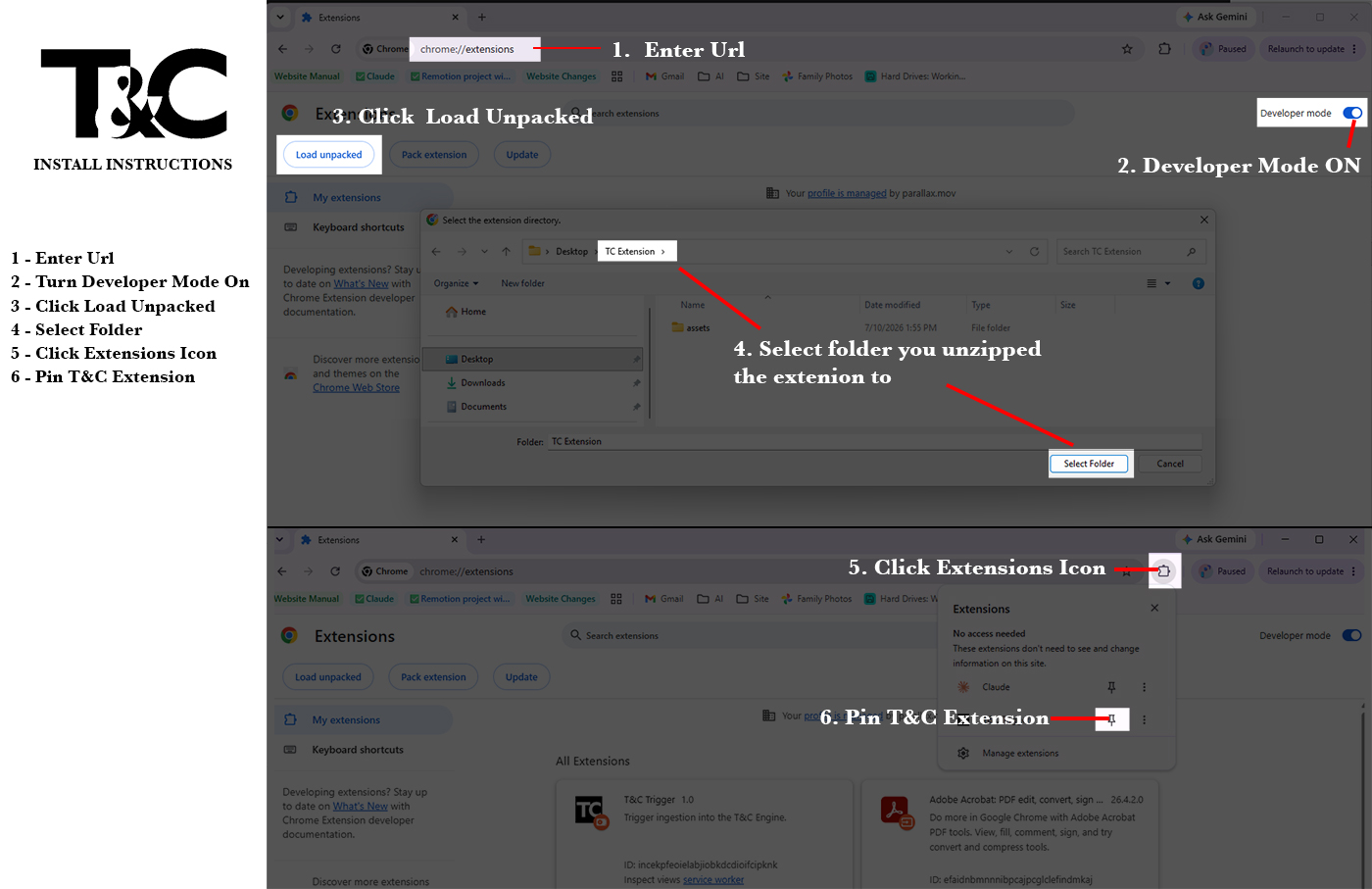
- Paste
chrome://extensionsinto the address bar. - Turn on Developer mode (toggle, top-right).
- Click Load unpacked and select the folder from step 1.
- Pin T&C Trigger from the puzzle-piece menu and sign in with your T&C account.
Chrome loads the extension from that folder every time it starts. Moving it breaks the extension.
Updating
When a new version is announced, open the extension folder and double-click the updater for your computer — it downloads the newest build and replaces the files in place:
- Mac: Update-Mac.command
- PC: Update-PC.cmd
Then quit Chrome completely and open it again — it picks up the new version automatically.
Mac: macOS blocks downloaded files the first time. When it says Not Opened, click Done (not "Move to Trash"), then open System Settings ▸ Privacy & Security ▸ Security (down by the bottom) ▸ click "Open Anyway" next to the file, then confirm. Never asked again. (Older macOS: right-click the file ▸ Open ▸ Open.)
PC: if Windows shows a security warning, click Run (or More info ▸ Run anyway).
Troubleshooting
| Symptom | Fix |
|---|---|
| "download failed" when updating | The updater downloads from the internet — check your connection and run it again. |
| Chrome says the extension is corrupted / missing | The folder was moved or deleted. Put it back (or re-download the zip and unzip it to the same place), then Load unpacked again. |